Entradas

Wi-Fi Capacity Planning and the Importance of Balancing between 2.4GHz and 5GHz

https://www.ekahau.com/blog/2017/05/30/wi-fi-capacity-planning-importance-balancing-2-4ghz-5ghz/

WHAT IS THE RANGE OF WI-FI?

Imagen
https://boundless.aerohive.com/technology/What-Is-The-Range-Of-Wi-Fi.html https://boundless.aerohive.com/technology/What-Is-The-Range-Of-Wi-Fi.html oo In a previous article I answered the question ‘ How many devices can my access point support? ’ Since then, I have received numerous questions about Wi-Fi range. Naturally, I decided to write another article! In it, I’ll cover the following:  Wireless range is  impacted  by natural elements and obstacles. It is not possible accurately define the range of a Wi-Fi device. Vendors sometimes specify range based on a ‘clean’ environment (usually anechoic chambers) with values not reflective of a real-world deployment. Wi-Fi range is a two-way street. It goes from AP to client and vice versa. Range can be manipulated and improved by utilizing various technologies, antenna options and proper planning. The Lightbulb Effect Wi-Fi  operates within the microwave frequency portion of the electromagnetic spectrum. E...
Interferencias: CCI (Co-Channel Interference) ACI (Adjacent Channel Interfence) “La red va lenta” es una queja muy común. El bajo rendimiento en una red Wi-Fi tiene múltiples causas pero una de las más habituales es el hecho que el aire es un medio que se comparte a la misma vez por todos los dispositivos Wi-Fi en el mismo canal y en la misma zona. Tener demasiados puntos de accesos en el mismo canal y en la misma zona se conoce como  Interferencia co-canal  (co-channel interference (CCI)) y para optimizar el rendimiento es fundamental reducirla en la medida de lo posible.  Sin embargo, en la banda de 2.4 GHz, hay otra fuente de problemas conocida como  Interferencia por canal adyacente  (adjacent channel interference (ACI)). Los canales adyacentes en la banda de 2.4 GHZ se solapan unos con otros, por ello el tráfico en un canal puede interferir con el existente en el canal vecino. Una buena práctica en 2.4 GHz es utilizar solo los canales 1, 6 y 11 porq...

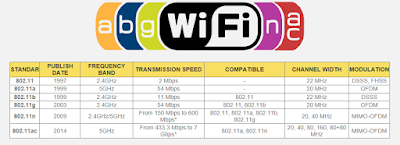
Resume. 802.11 standards.

Imagen

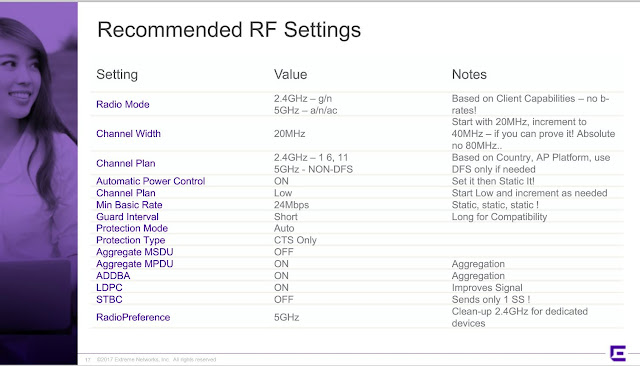
RF Settings.

Imagen

RTS/CTS.

RTS/CTS in 802.11g network with no 802.11b clients When there is mixed mode 802.11 b and g then RTS, CTS do come in as protection mechanism. Are there RTS and CTS packets sent when the network only consists of 802.11g devices ? Also, if they are not sent, please let me know why they are not applicable. When only 802.11g devices are present, RTS/CTS frames may still be present, but they are not required. The original purpose of RTS/CTS was basically a way for 802.11g stations to tell 802.11b stations to be quiet. Since 802.11b stations can't understand the modulation and coding of 802.11g OFDM transmissions, the 802.11g stations have to say to 802.11b stations "please don't interrupt while I talk in a foreign language." The beauty of RTS/CTS is that these frames are very small and pose very low overhead to the network. So, even though they were designed to facilitate backward compatibility between 802.11b and 11g, they can be used in other ways as well...

Wave1 vs Wave2.

Imagen
WHY YOU MIGHT BE PAYING DOUBLE FOR 802.11AC WAVE 2. In the Wi-Fi world, it’s generally safe to assume that newer means better, and therefore 802.11ac Wave 2 should be better than Wave 1 right? Well, it depends.  Wave 2 pushes the bandwidth barrier much higher than Wave 1, but only in a 3x3 or 4x4 Wave 2 access point, not in a 2x2 configuration. I’ll show you why in a minute.  2x2 Wave 2 access points are using the ‘Wave 2’ banner to pull a fast one on us, making us think we are getting faster speeds for a smaller budget, when really we are getting the same speed, for a higher price than Wave 1. That’s right, 2x2 Wave 2 offers little to no benefits over 2x2 Wave 1 access points, so I guess the ‘2’ just means 'pay twice as much'.  Let’s take a look under the hood of these 2x2 Wave 2 access points to discover why it makes no sense to a customer, only to the vendor.  First of all we need to understand the overall difference between Wave 1 and Wave 2 access po...